Middleware as a Service Cloud Setup(http://docs.oracle.com/cd/E24628_01/doc.121/e28814/cloud_mw_setup.htm#CEGIIDAJ) requires following steps:
1. Role and Users creation
Following users are needed for MW cloud setup
Note: SSA_DEV_ROLES is a custom role. Steps to create this role are given on this link.
http://docs.oracle.com/cd/E24628_01/doc.121/e28814/cloud_getstarted.htm#BEIFFHCF
2. Push agent on All Target Hosts
All hosts that participate in cloud setup should be EM targets and EM agent should be pushed on these hosts. steps are given on link
http://docs.oracle.com/cd/E24628_01/doc.121/e28814/cloud_paas_setup.htm#CHDGJDBH
3. Privilege Delegation Settings
Privilege delegation allows a logged-in user to perform an activity with the privileges of another user. Sudo and PowerBroker are privilege delegation tools that allow a logged-in user to be assigned these privileges. These privilege delegation settings will be used for all provisioning and patching activities on these hosts.
http://docs.oracle.com/cd/E24628_01/doc.121/e28814/cloud_getstarted.htm#CHDGJEEB
4. Software library configuration
The Software Library is a repository that stores software patches, virtual appliance images, reference gold images, application software and their associated directive scripts. Software library is needed for loading Out of Box WLS profiles. Steps to configure Software library are given on link
http://docs.oracle.com/cd/E24628_01/doc.121/e28814/cloud_getstarted.htm#BEIFJBHB
5. Loading Out of Box Middleware Provisioning Profiles
Download OOB Middleware Profiles using Self Update as given on link
http://docs.oracle.com/cd/E24628_01/doc.121/e28814/cloud_mw_setup.htm#CHDDHCAB
Note: These OOB profiles DO NOT contain any gold image. It just contains WLS domain definition, so user is expected to have MW home software only install as given in step 7.
6. Create PaaS Infrastructure Zone
Define a PaaS Infrastructure zone, include which hosts would be part of this zone and what users(roles) can access this zone.
http://docs.oracle.com/cd/E24628_01/doc.121/e28814/cloud_paas_setup.htm#CIHFFDIG
7. Create Middleware Home
OOB 10.3.6 WLS profiles require JRF enabled WLS 10.3.6 install. It can be a software only install done via
8. Configuring and Save the Deployment Procedure
Configure and save a Middleware Provisioning deployment procedure. This configured deployment procedure will be used by the EM_SSA_ADMINISTRATOR while creating a Middleware Service Template.
http://docs.oracle.com/cd/E24628_01/doc.121/e28814/cloud_mw_setup.htm#CEGFCBDE
9. Setting Up the MWaaS Self Service Portal
The EM_SSA_ADMINISTRATOR can configure and set up the middleware self service portal by creating middleware pools, quotas, request settings, and service templates.
http://docs.oracle.com/cd/E24628_01/doc.121/e28814/cloud_mw_portal.htm#CHDECCAI
10.Using the Middleware Cloud Self Service Portal
 This Portal can be used to
• Monitor resource allocation
• Request and Provision Middleware Services
• Monitor performance of provisioned middleware service
• Control availability of provisioned WebLogic servers through simple STARTUP / SHUTDOWN push buttons
• Scale Up / Scale down provisioned middleware instance
• Deploy/Undeploy/Redeploy Java EE Applications
• Create Data Sources
• Monitor deployed J2EE Applications
• Deletion of middleware service instances that will no longer be used
http://docs.oracle.com/cd/E24628_01/doc.121/e28814/cloud_mw_using.htm
1. Role and Users creation
Following users are needed for MW cloud setup
|
|
Role
|
Example username
|
|
1.
|
EM_CLOUD_ADMINISTRATOR
|
EM_CLOUD_ADMIN
|
|
2.
|
EM_SSA_ADMINISTRATOR
|
SSA_ADMIN
|
|
3.
|
SSA_DEV_ROLES
|
SSA_USER1
|
Note: SSA_DEV_ROLES is a custom role. Steps to create this role are given on this link.
http://docs.oracle.com/cd/E24628_01/doc.121/e28814/cloud_getstarted.htm#BEIFFHCF
2. Push agent on All Target Hosts
All hosts that participate in cloud setup should be EM targets and EM agent should be pushed on these hosts. steps are given on link
http://docs.oracle.com/cd/E24628_01/doc.121/e28814/cloud_paas_setup.htm#CHDGJDBH
3. Privilege Delegation Settings
Privilege delegation allows a logged-in user to perform an activity with the privileges of another user. Sudo and PowerBroker are privilege delegation tools that allow a logged-in user to be assigned these privileges. These privilege delegation settings will be used for all provisioning and patching activities on these hosts.
http://docs.oracle.com/cd/E24628_01/doc.121/e28814/cloud_getstarted.htm#CHDGJEEB
4. Software library configuration
The Software Library is a repository that stores software patches, virtual appliance images, reference gold images, application software and their associated directive scripts. Software library is needed for loading Out of Box WLS profiles. Steps to configure Software library are given on link
http://docs.oracle.com/cd/E24628_01/doc.121/e28814/cloud_getstarted.htm#BEIFJBHB
5. Loading Out of Box Middleware Provisioning Profiles
Download OOB Middleware Profiles using Self Update as given on link
http://docs.oracle.com/cd/E24628_01/doc.121/e28814/cloud_mw_setup.htm#CHDDHCAB
Note: These OOB profiles DO NOT contain any gold image. It just contains WLS domain definition, so user is expected to have MW home software only install as given in step 7.
6. Create PaaS Infrastructure Zone
Define a PaaS Infrastructure zone, include which hosts would be part of this zone and what users(roles) can access this zone.
http://docs.oracle.com/cd/E24628_01/doc.121/e28814/cloud_paas_setup.htm#CIHFFDIG
7. Create Middleware Home
OOB 10.3.6 WLS profiles require JRF enabled WLS 10.3.6 install. It can be a software only install done via
-WebCenter portal
11.1.1.6.0 (PS5) installer http://www.oracle.com/technetwork/middleware/webcenter/portal/downloads/index.html
OR
-SOA 11.1.1.6.0 (PS5)
installer
Note: Once a Middleware Home is created, it should be discovered and promoted to be visible under All Targets.8. Configuring and Save the Deployment Procedure
Configure and save a Middleware Provisioning deployment procedure. This configured deployment procedure will be used by the EM_SSA_ADMINISTRATOR while creating a Middleware Service Template.
http://docs.oracle.com/cd/E24628_01/doc.121/e28814/cloud_mw_setup.htm#CEGFCBDE
9. Setting Up the MWaaS Self Service Portal
The EM_SSA_ADMINISTRATOR can configure and set up the middleware self service portal by creating middleware pools, quotas, request settings, and service templates.
http://docs.oracle.com/cd/E24628_01/doc.121/e28814/cloud_mw_portal.htm#CHDECCAI
10.Using the Middleware Cloud Self Service Portal
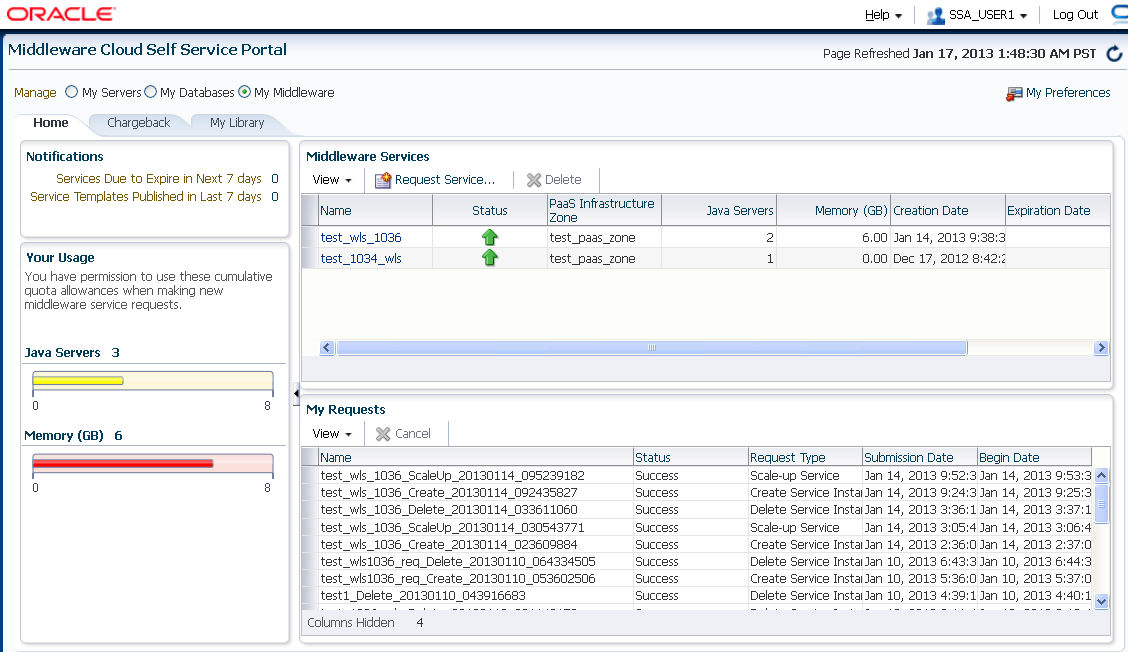
• Monitor resource allocation
• Request and Provision Middleware Services
• Monitor performance of provisioned middleware service
• Control availability of provisioned WebLogic servers through simple STARTUP / SHUTDOWN push buttons
• Scale Up / Scale down provisioned middleware instance
• Deploy/Undeploy/Redeploy Java EE Applications
• Create Data Sources
• Monitor deployed J2EE Applications
• Deletion of middleware service instances that will no longer be used
http://docs.oracle.com/cd/E24628_01/doc.121/e28814/cloud_mw_using.htm
